
To work with your colleagues in QuickTouch, you join your organization — your device company or your hospital. There are three ways in.
Ask to join
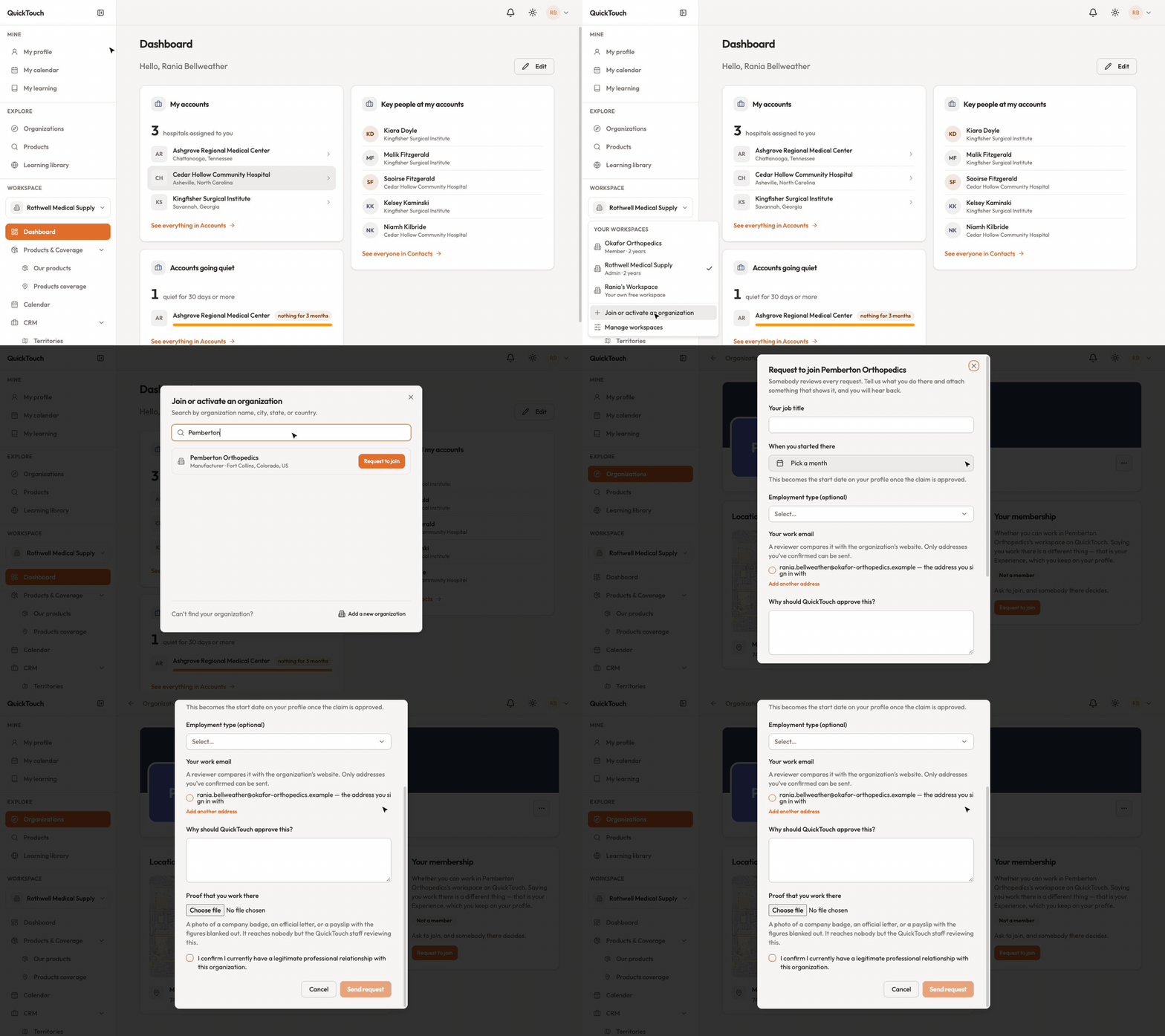
Open the workspace switcher in the sidebar and choose Join or activate an organization.
Search by name, city, state or country. Not listed? Use Add a new organization.
Click Request to join, fill in what it asks, and send it.
If your organization already uses QuickTouch, one of its administrators decides. If nobody from it is on QuickTouch yet, QuickTouch reviews the request instead, so you'll be asked for your job title, start date, work email and proof that you work there. Nothing changes for you until somebody decides. You can see or withdraw your request under Manage workspaces › Requests you've sent.
Join straight away with your work email
If your organization lets its email domain straight in and you have a confirmed address there, you'll see "Your address there is enough". Click Join and you're in. If you haven't confirmed that address yet, use Add my address and click the link we send you.
Accept an invitation
Open the link in the invitation email and choose Accept and open or Decline. Invitations waiting for you are also listed under Manage workspaces. If the link says it expired or was withdrawn, ask the person who invited you to send a new one.