
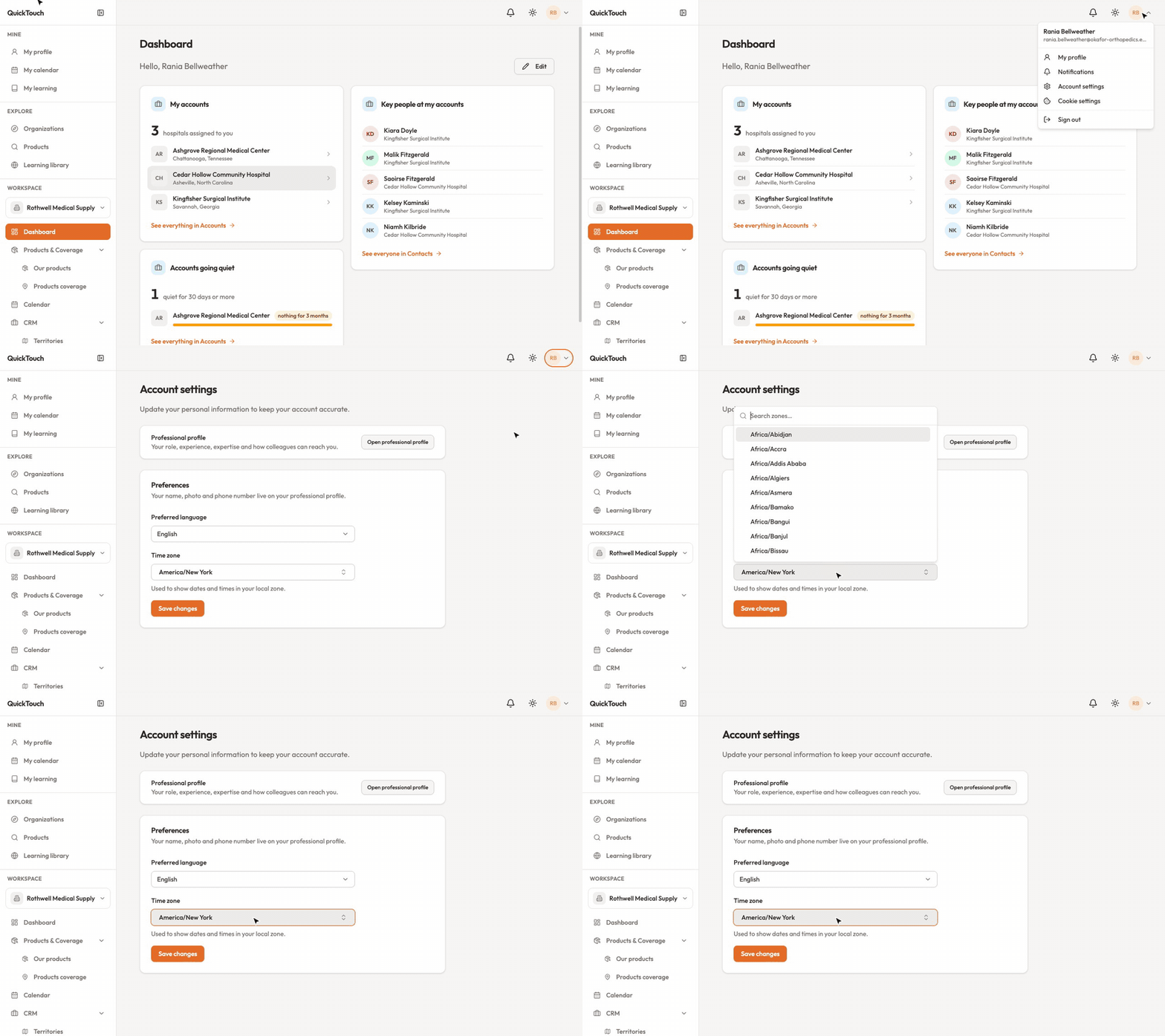
Click your initials in the top right and choose Account settings. Your name, photo and phone live on your profile instead.
Time zone
Under Preferences, pick your time zone and click Save changes. Dates and times are shown in it.
Change your email address
Enter the new address and click Send magic link.
Click the link sent to the new address. The change only happens then. Until you do, you can Cancel change.
Sign-in methods
Connect, change or remove the email link and Google. You always need to keep at least one.
Work email addresses
Add your work address and click the link we send. It proves where you work — for example, it can let you straight into your organization. It isn't used to sign in.
Active sessions
See every device you're signed in on. Click Revoke on one, or Sign out all other sessions if you've lost a phone or laptop.
Deactivate or delete your account
Deactivate signs you out and keeps your data. An administrator can reactivate you.
Request deletion sends us a request to delete your account. It isn't instant — we'll let you know when it's done.